![Endavo_logo_black-1.png]](https://help.endavomedia.com/hs-fs/hubfs/Endavo_logo_black-1.png?height=40&name=Endavo_logo_black-1.png)
One of the most important parts of building a successful OTT platform on Endavo is organizing your content correctly from the beginning. A well-structured library improves your internal workflow, simplifies content management, enhances syndication opportunities, and creates a better viewing experience for your audience across web, mobile, and TV apps.
Endavo’s content architecture is intentionally designed to separate content organization, content discovery, and content publishing into distinct systems. Understanding the purpose of each structure will help you scale your platform efficiently as your content library grows.
At the core of the Endavo ecosystem are four primary organizational components:
-
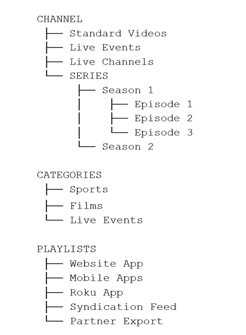
Channels - The foundational content containers
-
Series - Structured episodic/season-based content
-
Categories - Cross-channel discovery filters
-
Playlists - Publishing and syndication controls

Channels: The Foundation of Your Content Library
-
Channels are the primary organizational foundation inside Endavo. Every piece of published content in your library must belong to a channel.
Think of channels like major content hubs or branded collections. They help organize your library into logical groupings for both administrators and viewers.
Channels can contain:
• Standard on-demand videos
• Live events
• 24/7 live channels
• Series
A channel should generally represent a broad content destination, brand, topic, or programming group — not a narrow filtering mechanism.
Series: Structured Episodic Content
Series are a specialized content type used specifically for episodic or serialized programming. Unlike standard videos, series introduce an additional organizational hierarchy:
Series → Seasons → Episodes
Each series can contain:
-
One or more seasons
-
Multiple episodes within each season
-
Episode numbering and metadata
This structure allows Endavo-powered apps to deliver a familiar streaming experience similar to major OTT services.
Categories: Discovery Filters Across Channels
Categories are designed for content discovery — not primary organization.
Categories act as predefined filters that work across all channels to help viewers discover content based on interests, genres, formats, or themes.
Examples include:
-
Sports
-
Drama
-
Live Events
-
News
-
Kids
-
Education
A single piece of content can belong to multiple categories, even if it only belongs to one channel.
Channels vs. Categories: Understanding the Difference
Channels organize content ownership and structure, while categories organize content discovery.
Channels are foundational and required. Categories are flexible and optional.
Many users mistakenly try to use categories as channels or channels as categories. A cleaner structure is to use channels for brands or programming groups and categories for genres and viewer interests.
Playlists: Publishing and Distribution Control
Playlists determine what content actually gets published to your OTT apps and distribution endpoints.
Think of playlists as publishing containers.
Playlists can include:
-
Entire channels
-
Specific videos
-
Curated subsets of content
-
Live streams
-
Series
-
Syndication feeds
Playlists drive what appears in apps, websites, partner exports, and syndication feeds.
Recommended Best Practice Structure
Step 1: Create Channels First
Build your core library structure around major brands, topics, or programming groups.
Step 2: Add Series Inside Channels
Use series only for episodic programming.
Step 3: Apply Categories
Use categories to improve discovery across all channels.
Step 4: Build Playlists
Use playlists to control publishing, app experiences, and syndication.
Visualizing the Structure
Final Takeaway
The key to understanding Endavo’s architecture is recognizing that each system serves a different purpose:
-
Channels organize your library structure
-
Series organize episodic content
-
Categories improve discovery
-
Playlists control publishing and syndication
When used correctly together, these tools create cleaner backend workflows, easier content management, better OTT user experiences, improved scalability, and more flexible syndication and publishing.