---
title: Connect Payment Gateway
description: Connect your Stripe account to Endavo so you can offer subscriptions, PPV, and rentals and accept donations.
---
[Skip to content](https://help.endavomedia.com/knowledge/connecting-to-payment-gateway#main-content)
English
Show submenu for translations
[Need More Help?](https://help.endavomedia.com/knowledge/kb-tickets/new?hsLang=en)
![Endavo\_logo\_black-1.png\]](https://help.endavomedia.com/hs-fs/hubfs/Endavo_logo_black-1.png?height=40&name=Endavo_logo_black-1.png)
- [About OTT](https://www.endavomedia.com/what-is-ott/)
- [Blog](https://www.endavomedia.com/blog/)
- [Free Trial](https://www.endavomedia.com/free-trial-offer/)
Open main navigation
Close main navigation
- [About OTT](https://www.endavomedia.com/what-is-ott/)
- [Blog](https://www.endavomedia.com/blog/)
- [Free Trial](https://www.endavomedia.com/free-trial-offer/)
- English
Show submenu for translations
- [Need More Help?](https://help.endavomedia.com/knowledge/kb-tickets/new)
- [Endavo Dashboard Login](https://admin.endavomedia.com/login/)
[Endavo Dashboard Login](https://admin.endavomedia.com/login/)
Hello. How can we help you get the most out of Endavo?
- There are no suggestions because the search field is empty.
1. [Help Center](https://help.endavomedia.com/knowledge?hsLang=en)
2. [Manage Account](https://help.endavomedia.com/knowledge/manage-account?hsLang=en)
# Connect Payment Gateway
## Connect your Stripe account to Endavo so you can offer subscriptions, PPV, and rentals and accept donations.
Endavo uses **Stripe** as our primary **payment gateway** for web-based subscriptions and other transactions. Stripe offers a ton of features and flexibility for online services, including international services. You can **[click here](https://stripe.com/payments/payment-methods-guide#for-saas-and-subscription-businesses)** to learn more about Stripe generally, if you're not familiar with them.
Before you can set up Subscription Plans, Rental Plans for VOD or Live Events, or accept Donations, you must connect your Endavo account to your existing or new Stripe account.
#### Connect Stripe to Endavo
- Click on your Account Name (top right) dropdown and then go to **Manage Settings \> Payment Gateways \> Connect with Stripe**
> **💡 *Pro Tip for Existing Stripe Users:*** *Even if you already have an existing Stripe account and if you use it for another business, we highly recommend that you set up a separate account in your Stripe dashboard to separate Endavo transactions from your other business. You can have multiple accounts under the same Stripe Administrator. Log into your Stripe dashboard and you can add a new account by clicking Accounts on the top left and add a new account (call it "Endavo" or "\[your channel name\]"). Once added, you will see this account as an option when you connect your Stripe account using the instructions below. Or you can add new Stripe account once you click **Connect with Stripe \> Create a New Account**, and make sure you are signed into your main Stripe account as Administrator.*
- Complete the **Stripe Set Up Forms** to connect to your existing account or set up a new one. If you already have a Stripe account, you can use your account email and password to connect to existing account. [**CLICK HERE**](https://support.stripe.com/questions/getting-started-with-stripe-create-or-connect-an-account) if you need help connecting or setting up a new Stripe account, or for more help, watch the video below.
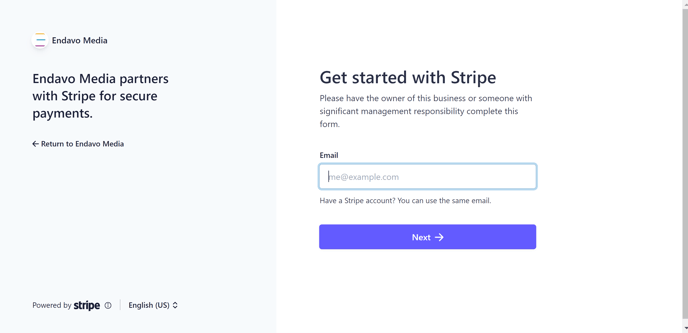
> 💡 Here's a video tutorial if you need more help setting up a new Stripe account:
>
>
- Before you take your Stripe account live, make sure to complete their **[Account Setup Checklist](https://stripe.com/docs/account/checklist)**
- Once your Stripe account is connected to your Endavo account, you will see your account listed as **Active** in your **Payment Gateways list**.
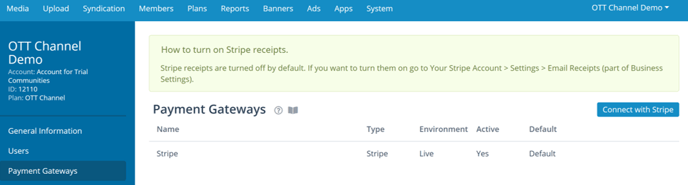
- Once Stripe is connected and is listed a **Active \> Yes**, you can then create subscription plans, rental plans and add donations in your Endavo dashboard under **Plans** tab in the main menu. **LEARN MORE** about setting up [**Subscriptions**](https://help.endavomedia.com/knowledge/subscription-plans?hsLang=en)and [**Rental Plans**](https://help.endavomedia.com/knowledge/rental-plans?hsLang=en).
### Working with Stripe
Endavo's integration with Stripe includes pulling real time transactional data from Stripe into EMMS so that you can track your OTT business performance (revenue, etc.) and individual transactions directly inside your Endavo dashboard. However, you may also want to get familiar with the Stripe dashboard, where you can find even more granular information and change certain payment gateway settings directly on Stripe. Log into your Stripe account to get familiar and learn more. Here's a short introduction to the Stripe dashboard to get you started:
### Additional Payment Gateways for Apps
For upgraded Endavo accounts with **mobile and OTT apps**, we also use individual app stores (e.g., Apple App Store, Roku) for **in-app purchases**, subscriptions and transactions. We have integrated with our supported app stores so that users who subscribe or make a purchase on any of your apps can securely authenticate and access purchased content or services across all of your apps. We also automatically collect all transactional data in EMMS from all the gateways, so you can track everything in one place and generate consolidated or separate reports.
Thanks for reading! Check out our [resources](https://www.endavomedia.com/resources/) and [blog](https://www.endavomedia.com/blog/) on our website to get more helpful tips, use cases, and creative ideas for building your OTT business.

- [Get Started on Endavo!](https://help.endavomedia.com/knowledge/get-started-on-endavo?hsLang=en)
- [Manage Account](https://help.endavomedia.com/knowledge/manage-account?hsLang=en)
- [Manage OTT Website and Apps](https://help.endavomedia.com/knowledge/manage-ott-website-and-apps?hsLang=en)
- [Manage Content Library](https://help.endavomedia.com/knowledge/manage-content-library?hsLang=en)
- [Channels and Playlists](https://help.endavomedia.com/knowledge/channels-and-playlists?hsLang=en)
- [Live Events and Live Channels](https://help.endavomedia.com/knowledge/live-events-and-live-channels?hsLang=en)
- [Monetize OTT Services](https://help.endavomedia.com/knowledge/monetize-ott-services?hsLang=en)
- [Get Reports and Analytics](https://help.endavomedia.com/knowledge/get-reports-and-analytics?hsLang=en)
- [Share Your Content](https://help.endavomedia.com/knowledge/share-your-content?hsLang=en)
- [Endavo Release Notes Hub](https://help.endavomedia.com/knowledge/endavo-release-notes-hub?hsLang=en)
- [About OTT](https://www.endavomedia.com/what-is-ott/)
- [Blog](https://www.endavomedia.com/blog/)
- [Free Trial](https://www.endavomedia.com/free-trial-offer/)
[](https://www.endavomedia.com/)
Endavo Help Center
Copyright © 2026, Endavo Media and Communications, Inc.